 dinos
dinos
613 lines
23 KiB
Markdown
613 lines
23 KiB
Markdown
> [!WARNING]
|
||
> 这是社区翻译版本,欢迎修正!
|
||
|
||
---
|
||
|
||
<div align="center">
|
||
<picture>
|
||
<source media="(prefers-color-scheme: light)" srcset="https://raw.githubusercontent.com/EvoScientist/EvoScientist/main/.github/assets/logo-dark.svg">
|
||
<source media="(prefers-color-scheme: dark)" srcset="https://raw.githubusercontent.com/EvoScientist/EvoScientist/main/.github/assets/logo-light.svg">
|
||
<img alt="EvoScientist Logo" src="https://raw.githubusercontent.com/EvoScientist/EvoScientist/main/.github/assets/logo-dark.svg" width="80%">
|
||
</picture>
|
||
</div>
|
||
|
||
<div align="center">
|
||
<a href="https://pypi.org/project/EvoScientist/"><picture>
|
||
<source media="(prefers-color-scheme: light)" srcset="https://raw.githubusercontent.com/EvoScientist/EvoScientist/main/.github/assets/badge-pypi-light.svg">
|
||
<source media="(prefers-color-scheme: dark)" srcset="https://raw.githubusercontent.com/EvoScientist/EvoScientist/main/.github/assets/badge-pypi-dark.svg">
|
||
<img alt="PyPI v0.0.6" src="https://raw.githubusercontent.com/EvoScientist/EvoScientist/main/.github/assets/badge-pypi-light.svg" height="28">
|
||
</picture></a><a href="https://EvoScientist.github.io/"><picture>
|
||
<source media="(prefers-color-scheme: light)" srcset="https://raw.githubusercontent.com/EvoScientist/EvoScientist/main/.github/assets/badge-website-light.svg">
|
||
<source media="(prefers-color-scheme: dark)" srcset="https://raw.githubusercontent.com/EvoScientist/EvoScientist/main/.github/assets/badge-website-dark.svg">
|
||
<img alt="Website" src="https://raw.githubusercontent.com/EvoScientist/EvoScientist/main/.github/assets/badge-website-light.svg" height="28">
|
||
</picture></a><a href="https://github.com/langchain-ai/deepagents"><picture>
|
||
<source media="(prefers-color-scheme: light)" srcset="https://raw.githubusercontent.com/EvoScientist/EvoScientist/main/.github/assets/badge-framework-light.svg">
|
||
<source media="(prefers-color-scheme: dark)" srcset="https://raw.githubusercontent.com/EvoScientist/EvoScientist/main/.github/assets/badge-framework-dark.svg">
|
||
<img alt="Framework DeepAgents" src="https://raw.githubusercontent.com/EvoScientist/EvoScientist/main/.github/assets/badge-framework-light.svg" height="28">
|
||
</picture></a><a href="https://github.com/EvoScientist/EvoScientist/blob/main/LICENSE"><picture>
|
||
<source media="(prefers-color-scheme: light)" srcset="https://raw.githubusercontent.com/EvoScientist/EvoScientist/main/.github/assets/badge-license-light.svg">
|
||
<source media="(prefers-color-scheme: dark)" srcset="https://raw.githubusercontent.com/EvoScientist/EvoScientist/main/.github/assets/badge-license-dark.svg">
|
||
<img alt="License Apache 2.0" src="https://raw.githubusercontent.com/EvoScientist/EvoScientist/main/.github/assets/badge-license-light.svg" height="28">
|
||
</picture></a>
|
||
</div>
|
||
|
||
---
|
||
|
||
<div align="center">
|
||
<a href="https://github.com/EvoScientist/EvoScientist"><img src="https://readme-typing-svg.demolab.com?font=Sans-Serif&pause=1000&color=64B5F6¢er=true&vCenter=true&width=435&lines=Towards+Self-Evolving+AI+Scientists;Harness+Vibe+Research" alt="Typing SVG" /></a>
|
||
</div>
|
||
|
||
<div align="center">
|
||
|
||
**[English](./README.md) | 简体中文**
|
||
|
||
|
||
|
||
</div>
|
||
|
||
**EvoScientist 旨在通过构建自我进化的 AI 科学家来驱动 Vibe Research——让 AI 自主探索、生成洞见并持续迭代优化。
|
||
它以开箱即用为设计理念,提供一个伴随智能体技能、工具集和记忆库共同成长的活跃研究系统。
|
||
EvoScientist 超越了传统的人在回路(Human-in-the-Loop)模式,采用人在环上(Human-on-the-Loop)范式——AI 作为研究伙伴,与人类研究者共同进化,逐步内化学术品味与科学判断力。**
|
||
|
||
<h3>🏆 荣誉与认可</h3>
|
||
|
||
<table>
|
||
<tr>
|
||
<td align="center" valign="top" width="33%">
|
||
<img src="https://raw.githubusercontent.com/EvoScientist/EvoScientist/main/.github/assets/ICAIS_awards.JPG" height="180" alt="ICAIS 2025 Awards"/>
|
||
<br />
|
||
<sub><b>最佳论文与评审奖</b></sub>
|
||
</td>
|
||
<td align="center" valign="top" width="33%">
|
||
<img src="https://raw.githubusercontent.com/EvoScientist/EvoScientist/main/.github/assets/ICAIS_best_paper.png" height="180" alt="Best Paper"/>
|
||
<br />
|
||
<sub><b>AI 生成最佳论文</b></sub>
|
||
</td>
|
||
<td align="center" valign="top" width="33%">
|
||
<img src="https://raw.githubusercontent.com/EvoScientist/EvoScientist/main/.github/assets/deepresearch_bench_2.JPG" height="180" alt="DeepResearch Bench II #1"/>
|
||
<br />
|
||
<sub><b>DeepResearch Bench II 第一名</b></sub>
|
||
</td>
|
||
</tr>
|
||
</table>
|
||
|
||
<br />
|
||
|
||
<table>
|
||
<tr>
|
||
<td align="center" valign="top" width="50%">
|
||
<img src="https://raw.githubusercontent.com/EvoScientist/EvoScientist/main/.github/assets/asta_bench_code.png" height="180" alt="AstaBench Code & Execution #1"/>
|
||
<br />
|
||
<sub><b>AstaBench 代码与执行榜第一名</b></sub>
|
||
</td>
|
||
<td align="center" valign="top" width="50%">
|
||
<img src="https://raw.githubusercontent.com/EvoScientist/EvoScientist/main/.github/assets/asta_bench_data.png" height="180" alt="AstaBench Data Analysis #1"/>
|
||
<br />
|
||
<sub><b>AstaBench 数据分析榜第一名</b></sub>
|
||
</td>
|
||
</tr>
|
||
</table>
|
||
|
||
<h3>⚡ 统一入口,多端体验</h3>
|
||
|
||
<table>
|
||
<tr>
|
||
<th width="75%"><p align="center">🖥️ CLI / TUI</p></th>
|
||
<th width="25%"><p align="center">📱 移动端</p></th>
|
||
</tr>
|
||
<tr>
|
||
<td align="center">
|
||
<video src="https://github.com/user-attachments/assets/a40ba429-bb07-4663-b5b1-77aed1a833b9" autoplay loop muted playsinline width="100%">
|
||
<a href="https://github.com/user-attachments/assets/a40ba429-bb07-4663-b5b1-77aed1a833b9">观看演示视频</a>
|
||
</video>
|
||
</td>
|
||
<td align="center">
|
||
<video src="https://github.com/user-attachments/assets/4919e6f4-e434-46c9-98c7-35d7482868a6" width="100%" autoplay loop muted playsinline>
|
||
<a href="https://github.com/user-attachments/assets/4919e6f4-e434-46c9-98c7-35d7482868a6">观看移动端演示</a>
|
||
</video>
|
||
</td>
|
||
</tr>
|
||
</table>
|
||
|
||
## ✨ 特性
|
||
|
||
- **🤖 多智能体协作** — 6 个子智能体(规划、调研、编码、调试、分析、写作)协同工作。
|
||
- **🧠 持久化记忆** — 上下文、偏好和研究发现跨会话保持。
|
||
- **🌐 多模型供应商** — Anthropic、OpenAI、Google、MiniMax、NVIDIA——一处配置,随时切换。
|
||
- **📱 多渠道接入** — CLI 为中心;Telegram、Slack、飞书、微信等——共享同一智能体会话。
|
||
- **🔬 科学工作流** — 需求采集 → 规划 → 执行 → 评估 → 撰写 → 验证。
|
||
- **🔄 代码生成模式** — More Effort(迭代精修),持续迭代提升代码生成质量。
|
||
- **⚡ 自适应工具** — 每轮对话智能筛选相关工具,减少干扰提升效率。
|
||
- **✂️ 上下文编辑** — 根据对话状态动态改写系统提示词。
|
||
- **🔌 MCP 与 Skills** — 即插即用 MCP 服务器,或从 GitHub 一键安装技能包。
|
||
|
||
> [!TIP]
|
||
> 寻找开箱即用的研究技能?查看 [**EvoSkills**](https://github.com/EvoScientist/EvoSkills) — 由 **EvoScientist** 引擎驱动,结合可安装技能,端到端研究全流程一步到位。EvoSkills 同样兼容各类 CLI 编程智能体。
|
||
|
||
## 🔥 动态
|
||
|
||
- **[2026 年 3 月 26 日]** 🥇 提交时在 [AstaBench 数据分析](https://allenai-asta-bench-leaderboard.hf.space/home) 排名第一 👈
|
||
- **[2026 年 3 月 25 日]** 🥇 提交时在 [AstaBench 代码与执行](https://allenai-asta-bench-leaderboard.hf.space/home) 排名第一 👈
|
||
- **[2026 年 3 月 13 日]** 🚀 [**EvoScientist**](https://github.com/EvoScientist/EvoScientist) 正式亮相!
|
||
- **[2026 年 3 月 11 日]** ⛳ 技术报告已上线 👈
|
||
- **[2026 年 3 月 6 日]** 🥇 提交时在 [DeepResearch Bench II](https://agentresearchlab.com/benchmarks/deepresearch-bench-ii/index.html#leaderboard) 排名第一 👈
|
||
- **[2025 年 11 月 24 日]** 🏆 [ICAIS 2025](https://icais.ai/) AI Scientist Track 6/6 全部中稿 — Best Paper & AI Reviewer's Appraisal Award 👈
|
||
|
||
## 📖 目录
|
||
|
||
- [📦 安装](#-安装)
|
||
- [🔑 配置](#-配置)
|
||
- [⚡ 快速上手](#-快速上手)
|
||
- [🍪 示例与实践](#-示例与实践)
|
||
- [🔌 MCP 集成](#-mcp-集成)
|
||
- [📱 渠道接入](#-渠道接入)
|
||
- [📚 致谢](#-致谢)
|
||
- [🎯 路线图](#-ᯓ-路线图)
|
||
- [🌍 项目角色](#-项目角色)
|
||
- [🤝 贡献](#-贡献)
|
||
- [📝 引用](#-引用)
|
||
|
||
## 📦 安装
|
||
|
||
> [!TIP]
|
||
> 需要 **Python 3.11+**(**< 3.14**)。推荐使用 [**uv**](https://docs.astral.sh/uv/) 或 **conda** 进行依赖管理和虚拟环境管理。
|
||
|
||
<details>
|
||
<summary>🪛 安装 uv(如果尚未安装)</summary>
|
||
|
||
```bash
|
||
curl -LsSf https://astral.sh/uv/install.sh | sh
|
||
```
|
||
|
||
</details>
|
||
|
||
### 快速安装
|
||
|
||
```bash
|
||
uv tool install EvoScientist
|
||
```
|
||
|
||
> [!NOTE]
|
||
> 更新已安装的版本到最新,请使用 `uv tool upgrade`:
|
||
> ```bash
|
||
> uv tool upgrade EvoScientist
|
||
> ```
|
||
|
||
或安装到当前环境:
|
||
|
||
```bash
|
||
uv pip install EvoScientist
|
||
```
|
||
|
||
### 从 GitHub 安装最新版本
|
||
|
||
获取 [PyPI](https://pypi.org/project/EvoScientist/) 发布前的最新补丁:
|
||
|
||
```bash
|
||
uv pip install git+https://github.com/EvoScientist/EvoScientist.git
|
||
```
|
||
|
||
### 开发安装
|
||
|
||
```bash
|
||
git clone https://github.com/EvoScientist/EvoScientist.git
|
||
cd EvoScientist
|
||
uv sync --dev
|
||
```
|
||
|
||
enable pre-commit hooks:
|
||
```bash
|
||
uv run pre-commit install
|
||
```
|
||
|
||
<details>
|
||
<summary> 使用 conda</summary>
|
||
|
||
```bash
|
||
conda create -n EvoSci python=3.11 -y
|
||
conda activate EvoSci
|
||
pip install -e ".[dev]"
|
||
```
|
||
|
||
</details>
|
||
|
||
<details>
|
||
<summary> 使用 PyPi</summary>
|
||
|
||
```bash
|
||
pip install EvoScientist # quick install
|
||
pip install -e ".[dev]" # development install
|
||
```
|
||
|
||
</details>
|
||
|
||
<details>
|
||
<summary> 可选:渠道依赖</summary>
|
||
|
||
消息渠道集成需要额外依赖,按需安装即可:
|
||
|
||
```bash
|
||
uv pip install "EvoScientist[telegram]" # Telegram
|
||
uv pip install "EvoScientist[discord]" # Discord
|
||
uv pip install "EvoScientist[slack]" # Slack
|
||
uv pip install "EvoScientist[wechat]" # 微信
|
||
uv pip install "EvoScientist[qq]" # QQ
|
||
uv pip install "EvoScientist[feishu]" # 飞书
|
||
uv pip install "EvoScientist[all-channels]" # 全部
|
||
```
|
||
|
||
</details>
|
||
|
||
<details>
|
||
<summary> 升级到最新代码库</summary>
|
||
|
||
```bash
|
||
git pull && uv sync --dev
|
||
```
|
||
|
||
</details>
|
||
|
||
<p align="right"><a href="#top">🔝回到顶部</a></p>
|
||
|
||
## 🔑 配置
|
||
|
||
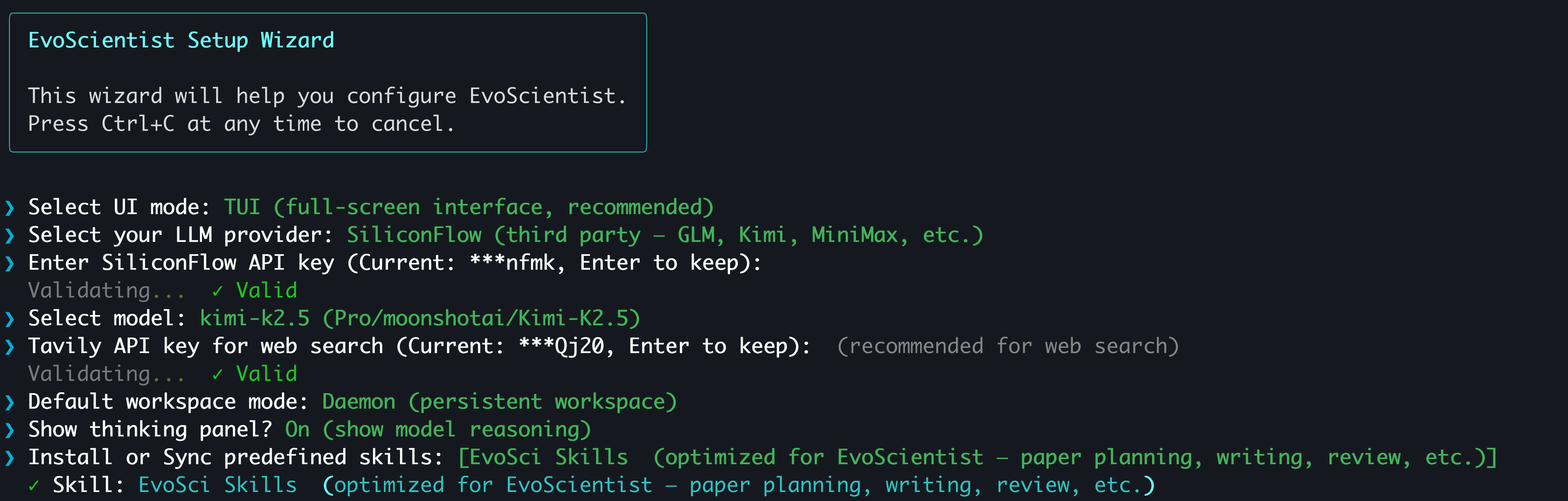
最简单的方式是使用交互式配置向导:
|
||
|
||
```bash
|
||
EvoSci onboard
|
||
```
|
||
|
||
> [!TIP]
|
||
> 向导将引导你完成供应商选择、密钥验证、模型选择和工作区模式设置。
|
||
> 支持 CLI 编程智能体订阅用户通过 OAuth 直连——无需 API Key。
|
||
|
||
|
||
|
||
<details>
|
||
<summary> 📟 通过环境变量手动配置</summary>
|
||
|
||
至少设置一个 LLM 供应商密钥,搜索密钥为可选项:
|
||
|
||
```bash
|
||
# 选择一个 LLM 供应商
|
||
export ANTHROPIC_API_KEY="sk-..." # Claude — console.anthropic.com
|
||
export OPENAI_API_KEY="sk-..." # GPT — platform.openai.com
|
||
export GOOGLE_API_KEY="AI..." # Gemini — aistudio.google.com/api-keys
|
||
export MINIMAX_API_KEY="sk-..." # MiniMax — platform.minimaxi.com(默认,中国大陆)或 platform.minimax.io(国际版)
|
||
export MINIMAX_BASE_URL="https://api.minimax.io/anthropic" # 仅国际版需要设置(默认: https://api.minimaxi.com/anthropic)
|
||
export NVIDIA_API_KEY="nvapi-..." # NIM — build.nvidia.com
|
||
|
||
# 网络搜索(可选)
|
||
export TAVILY_API_KEY="tvly-..." # app.tavily.com
|
||
```
|
||
|
||
也可以使用 `EvoSci config set` 将密钥持久化到 `~/.config/evoscientist/config.yaml`。
|
||
|
||
或者复制示例 `.env` 文件用于项目级配置:
|
||
|
||
```bash
|
||
cp .env.example .env # 填入你的密钥
|
||
```
|
||
|
||
> ⚠️ 切勿将包含真实密钥的 `.env` 文件提交到版本库。该文件已在 `.gitignore` 中。
|
||
|
||
</details>
|
||
|
||
<p align="right"><a href="#top">🔝回到顶部</a></p>
|
||
|
||
## ⚡ 快速上手
|
||
|
||
```bash
|
||
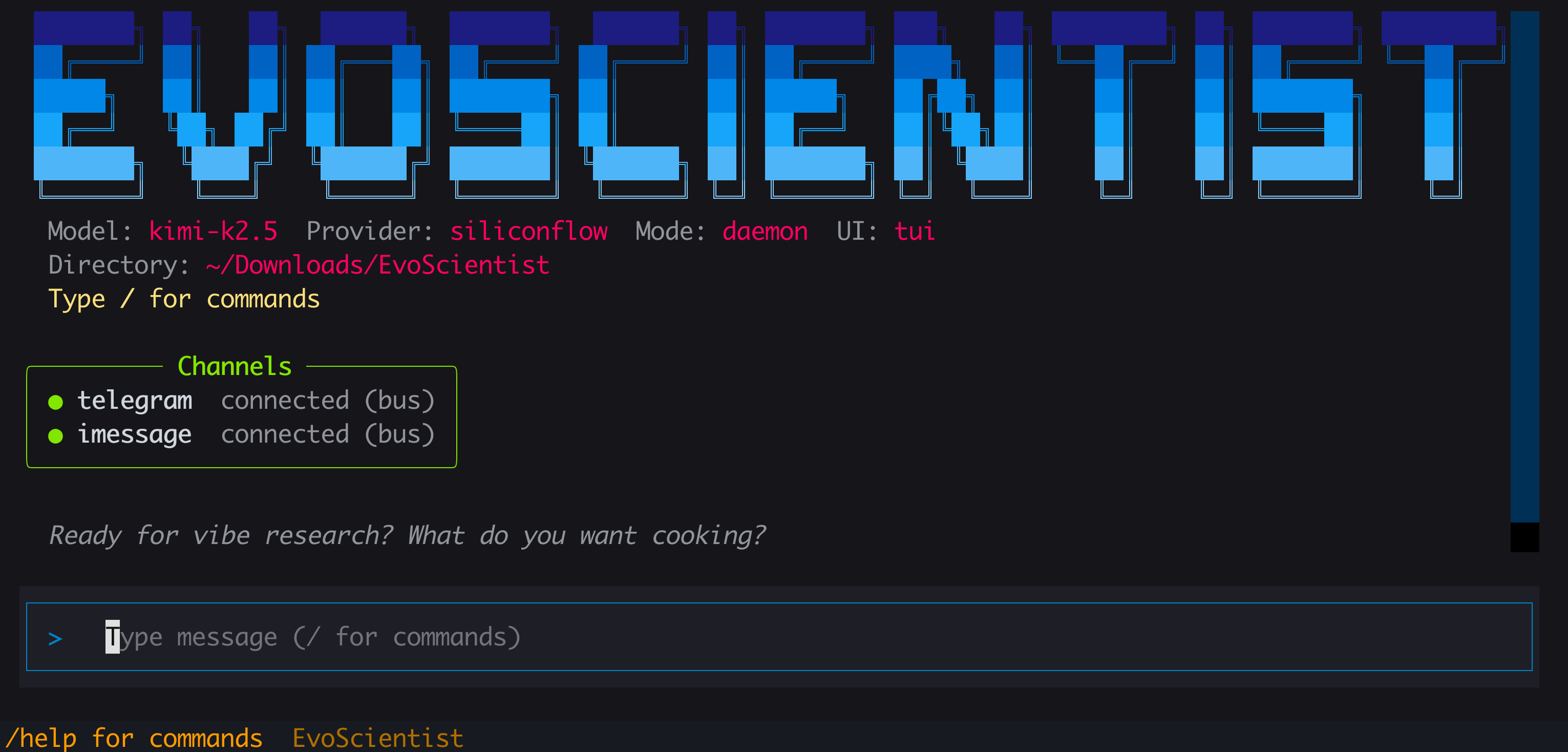
EvoSci # 或 EvoScientist — 交互模式(默认 TUI)
|
||
```
|
||
|
||
|
||
|
||
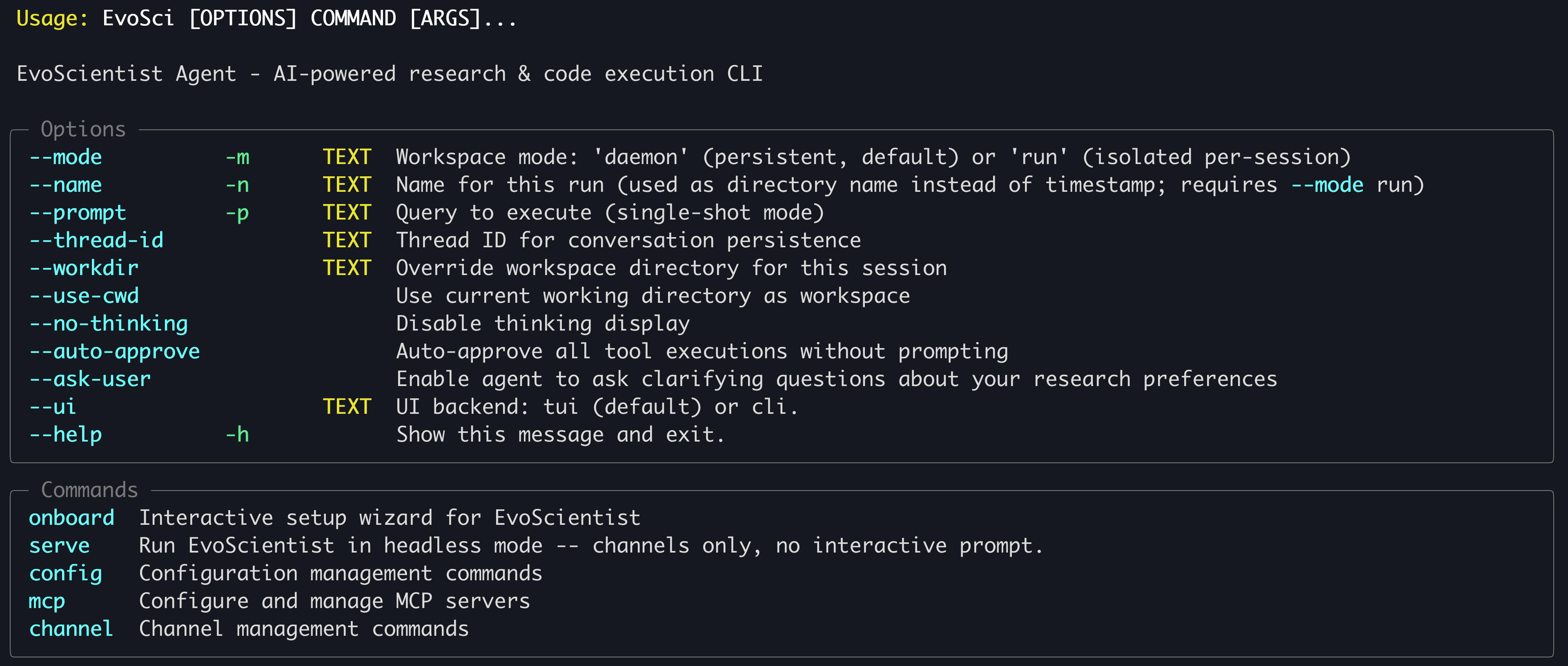
> 运行 `EvoSci -h` 查看全部 CLI 选项。
|
||
|
||
|
||
|
||
> [!TIP]
|
||
> 需要复制长输出?使用 `--ui cli` 切换到经典模式,即可使用终端原生复制。macOS [iTerm2](https://iterm2.com/) 用户也可以按住 `⌥ Option` 拖选文字,再 `⌘+C` 复制。
|
||
|
||
<details>
|
||
<summary>常用示例</summary>
|
||
|
||
```bash
|
||
EvoSci # 交互模式(默认 TUI)
|
||
EvoSci -p "你的问题" # 单次查询模式
|
||
EvoSci --workdir /path/to/project # 在指定目录下启动
|
||
EvoSci -m run # 隔离的会话级工作区
|
||
EvoSci --ui cli # 经典 CLI(轻量)
|
||
EvoSci serve # 无头模式——仅渠道,无交互提示符
|
||
```
|
||
|
||
</details>
|
||
|
||
<details>
|
||
<summary>操作审批</summary>
|
||
|
||
默认情况下,Shell 命令(`execute` 工具)执行前需要人工审批。跳过审批提示的方式:
|
||
|
||
```bash
|
||
# 单次会话:通过 CLI 参数启用自动审批
|
||
EvoSci --auto-approve
|
||
EvoSci -p "query" --auto-approve
|
||
|
||
# 持久化:写入配置(对所有后续会话生效)
|
||
EvoSci config set auto_approve true
|
||
|
||
# 或仅放行特定命令前缀
|
||
EvoSci config set shell_allow_list "python,pip,pytest,ruff,git"
|
||
```
|
||
|
||
会话中也可以在审批提示时回复 **3**(Approve all),仅对当次会话自动审批后续所有操作。
|
||
|
||
</details>
|
||
|
||
<details>
|
||
<summary>智能体提问</summary>
|
||
|
||
智能体可以在需要澄清时主动向你提问(例如数据集选择、实验方向等)。此功能默认开启。关闭方式:
|
||
|
||
```bash
|
||
# 持久化:写入配置
|
||
EvoSci config set enable_ask_user false
|
||
|
||
# 重新开启
|
||
EvoSci config set enable_ask_user true
|
||
```
|
||
|
||
</details>
|
||
|
||
<details>
|
||
<summary>会话内命令</summary>
|
||
|
||
| 命令 | 说明 |
|
||
| ---- | ---- |
|
||
| `/current` | 显示当前会话信息 |
|
||
| `/threads` | 列出最近的会话 |
|
||
| `/resume` | 恢复之前的会话 |
|
||
| `/delete` | 删除已保存的会话 |
|
||
| `/new` | 开始新会话 |
|
||
| `/clear` | 清除聊天记录 |
|
||
| `/skills` | 列出已安装的技能包 |
|
||
| `/install-skill <src>` | 从本地路径或 GitHub 安装技能包 |
|
||
| `/uninstall-skill <name>` | 卸载已安装的技能包 |
|
||
| `/mcp` | 管理 MCP 服务器 |
|
||
| `/channel` | 配置消息渠道 |
|
||
| `/help` | 显示可用命令 |
|
||
| `/exit` | 退出 |
|
||
|
||
</details>
|
||
|
||
<details>
|
||
<summary>脚本调用</summary>
|
||
|
||
```python
|
||
from EvoScientist import EvoScientist_agent
|
||
from langchain_core.messages import HumanMessage
|
||
from EvoScientist.utils import format_messages
|
||
|
||
thread = {"configurable": {"thread_id": "1"}}
|
||
last_len = 0
|
||
|
||
for state in EvoScientist_agent.stream(
|
||
{"messages": [HumanMessage(content="Hi?")]},
|
||
config=thread,
|
||
stream_mode="values",
|
||
):
|
||
msgs = state["messages"]
|
||
if len(msgs) > last_len:
|
||
format_messages(msgs[last_len:])
|
||
last_len = len(msgs)
|
||
```
|
||
|
||
</details>
|
||
|
||
<p align="right"><a href="#top">🔝回到顶部</a></p>
|
||
|
||
## 🍪 示例与实践
|
||
|
||
收集了一些官方示例、进阶用法和社区贡献的实践方案,帮助你更好地使用 EvoScientist。
|
||
|
||
👉 **[浏览全部示例与实践 →](docs/README.md)**
|
||
|
||
<p align="right"><a href="#top">🔝回到顶部</a></p>
|
||
|
||
## 🔌 MCP 集成
|
||
|
||
通过 [MCP](https://modelcontextprotocol.io/) 服务器一条命令即可添加外部工具:
|
||
|
||
```bash
|
||
# 用法
|
||
EvoSci mcp add <name> <command> [-- args...]
|
||
|
||
# 示例
|
||
EvoSci mcp add sequential-thinking npx -- -y @modelcontextprotocol/server-sequential-thinking
|
||
```
|
||
|
||
> [!TIP]
|
||
> 关于命令选项、配置字段、工具路由、通配符过滤和故障排查,请参阅 **[MCP 集成指南](https://github.com/EvoScientist/EvoScientist/tree/main/EvoScientist/mcp#model-context-protocol-integration)**。
|
||
|
||
<p align="right"><a href="#top">🔝回到顶部</a></p>
|
||
|
||
## 📱 渠道接入
|
||
|
||
连接消息平台,使其与 CLI 共享同一智能体会话:
|
||
|
||
```bash
|
||
# 用法
|
||
EvoSci channel setup <channel>
|
||
|
||
# 示例
|
||
EvoSci channel setup telegram
|
||
```
|
||
|
||
多个渠道可同时运行——在配置中用逗号分隔:
|
||
|
||
```yaml
|
||
channel_enabled: "telegram,slack,feishu,qq"
|
||
```
|
||
|
||
也可以在 CLI 会话中通过 `/channel` 交互式启动渠道。
|
||
|
||
> [!TIP]
|
||
> 关于各渠道设置指南、功能矩阵、架构详情和故障排查,请参阅 **[渠道集成指南](https://github.com/EvoScientist/EvoScientist/tree/main/EvoScientist/channels#channels)**。
|
||
|
||
<p align="right"><a href="#top">🔝回到顶部</a></p>
|
||
|
||
## 📚 致谢
|
||
|
||
本项目基于以下优秀的开源项目构建:
|
||
|
||
- [**LangChain**](https://github.com/langchain-ai/langchain) — 构建智能体和 LLM 驱动应用的框架。
|
||
- [**DeepAgents**](https://github.com/langchain-ai/deepagents) — 开箱即用的智能体编排框架。
|
||
|
||
感谢以上项目作者对开源社区的宝贵贡献。
|
||
|
||
<p align="right"><a href="#top">🔝回到顶部</a></p>
|
||
|
||
## 🎯 ᯓ➤ 路线图
|
||
|
||
即将推出:
|
||
- [x] 🖥️ 全屏 TUI 和经典 CLI 双界面
|
||
- [x] 📻 EvoMemory v1.0 已上线
|
||
- [x] ⚒️ 200+ 预置技能已内置
|
||
- [x] 🧩 内置研究全流程技能已上线
|
||
- [x] 👋 Human-in-the-loop 操作审批
|
||
- [x] 🦾 智能体主动向人类澄清确认
|
||
- [x] 📑 技术报告已发布
|
||
- [x] 🔐 OAuth 登录(CLI 编程智能体订阅用户)
|
||
- [ ] 📺 带工作区的 Web 应用界面
|
||
- [ ] 📹 Demo 与教程正在制作中
|
||
- [ ] 📊 基准测试套件即将推出
|
||
- [ ] ⏰ 核心系统定时任务规划中
|
||
|
||
敬请期待——更多功能正在路上!
|
||
|
||
<p align="right"><a href="#top">🔝回到顶部</a></p>
|
||
|
||
## 🌍 项目角色
|
||
|
||
#### Core Contributors
|
||
|
||
<table>
|
||
<tbody>
|
||
<tr>
|
||
<td align="center">
|
||
<a href="https://x-izhang.github.io/">
|
||
<img src="https://x-izhang.github.io/author/xi-zhang/avatar_hu13660783057866068725.jpg"
|
||
width="100" height="100"
|
||
style="object-fit: cover; border-radius: 20%;" alt="Xi Zhang"/>
|
||
<br />
|
||
<sub><b>Xi Zhang</b></sub>
|
||
</a>
|
||
</td>
|
||
<td align="center">
|
||
<a href="https://youganglyu.github.io/">
|
||
<img src="https://youganglyu.github.io/images/profile.png"
|
||
width="100" height="100"
|
||
style="object-fit: cover; border-radius: 20%;" alt="Yougang Lyu"/>
|
||
<br />
|
||
<sub><b>Yougang Lyu</b></sub>
|
||
</a>
|
||
</td>
|
||
<td align="center">
|
||
<a href="https://din0s.me/">
|
||
<img src="https://din0s.me/images/pk.jpg"
|
||
width="100" height="100"
|
||
style="object-fit: cover; border-radius: 20%;" alt="Dinos Papakostas"/>
|
||
<br />
|
||
<sub><b>Dinos Papakostas</b></sub>
|
||
</a>
|
||
</td>
|
||
<td align="center">
|
||
<a href="https://go0day.github.io/">
|
||
<img src="https://go0day.github.io/authors/admin/avatar_hu_ee1051aceae96124.png"
|
||
width="100" height="100"
|
||
style="object-fit: cover; border-radius: 20%;" alt="Yuyue Zhao"/>
|
||
<br />
|
||
<sub><b>Yuyue Zhao</b></sub>
|
||
</a>
|
||
</td>
|
||
<td align="center">
|
||
<a href="https://muxincg2004.github.io/">
|
||
<img src="https://muxincg2004.github.io/resume_avatar.jpg"
|
||
width="100" height="100"
|
||
style="object-fit: cover; border-radius: 20%;" alt="Ziheng Zhang"/>
|
||
<br />
|
||
<sub><b>Ziheng Zhang</b></sub>
|
||
</a>
|
||
</td>
|
||
<td align="center">
|
||
<a href="https://xiaohuiyan.github.io/">
|
||
<img src="https://xiaohuiyan.github.io/img/me.jpg"
|
||
width="100" height="100"
|
||
style="object-fit: cover; border-radius: 20%;" alt="Xiaohui Yan"/>
|
||
<br />
|
||
<sub><b>Xiaohui Yan</b></sub>
|
||
</a>
|
||
</td>
|
||
</tr>
|
||
</tbody>
|
||
</table>
|
||
|
||
#### Contributors
|
||
|
||
Jan Piotrowski, Wiktor Cupiał, Jakub Kaliski, Jakub Filipiuk, Xinhao Yi, Shuyu Guo, Andreas Sauter, Wenxiang Hu, Jacopo Urbani, Zaiqiao Meng, Jun Luo, Lun Zhou
|
||
|
||
> <a href="https://xiaoyi.huawei.com/chat/research"><img src="https://raw.githubusercontent.com/EvoScientist/EvoScientist/main/.github/assets/xiaoyi-deepresearch.webp" height="16" alt="Xiaoyi DeepResearch" align="center" /></a> [*Xiaoyi DeepResearch*](https://xiaoyi.huawei.com/chat/research) *Team* 及更广泛的开源社区共同为本项目做出贡献。
|
||
|
||
如有任何咨询或合作意向,请联系:[**EvoScientist.ai@gmail.com**](mailto:evoscientist.ai@gmail.com)
|
||
|
||
<p align="right"><a href="#top">🔝回到顶部</a></p>
|
||
|
||
## 🤝 贡献
|
||
|
||
<img align="right" alt="EvoScientist Team" src="https://raw.githubusercontent.com/EvoScientist/EvoScientist/main/.github/assets/EvoScientist_team.png" width="20%" />
|
||
|
||
我们欢迎各层次的开发者、研究者以及 AI 编程助手参与贡献。我们的 [贡献指南](./CONTRIBUTING.md) 同时面向人类和 AI Agent 编写,涵盖架构说明、设计模式、扩展指南和代码规范,帮助你安全高效地参与项目开发。
|
||
|
||
### 👥 社区贡献者
|
||
|
||
⚗️ 加入 EvoScientist 社区,探讨 AI 驱动的科研前沿,分享实验成果,共同推动自动化科学发现的未来。
|
||
|
||
- [Discord](https://discord.gg/AZ9ZMXkunY) — 实时提问、分享发现,与研究者和开发者协作交流。
|
||
- [微信](https://github.com/EvoScientist/EvoScientist/blob/main/.github/assets/cn_info.md) — 加入中文社区,与国内研究者和开发者交流。
|
||
|
||
<img src="https://raw.githubusercontent.com/EvoScientist/EvoScientist/main/.github/assets/wechat_group.jpeg" alt="微信群二维码" width="200"/>
|
||
|
||
每一份贡献,都让我们离 AI 驱动科学突破、造福全人类的未来更近一步。
|
||
|
||
<a href="https://github.com/EvoScientist/EvoScientist/graphs/contributors">
|
||
<img src="https://contrib.rocks/image?repo=EvoScientist/EvoScientist" />
|
||
</a>
|
||
|
||
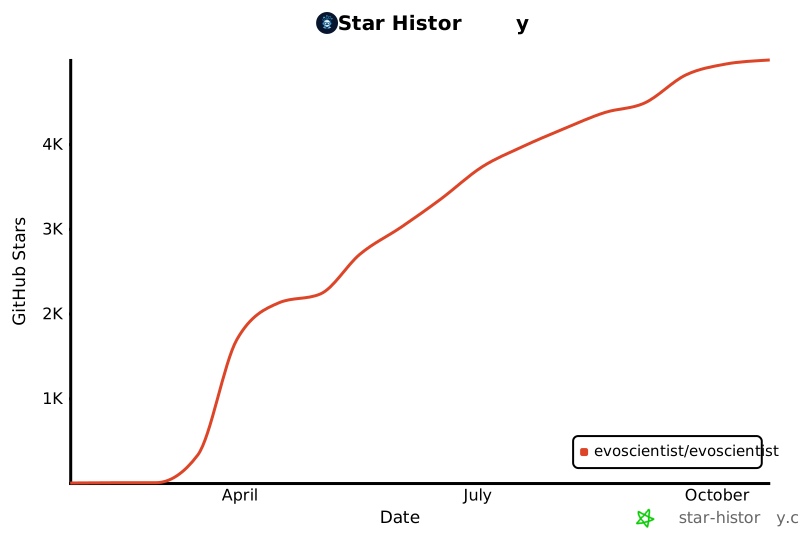
### 📈 Star 趋势
|
||
|
||
[](https://www.star-history.com/?repos=EvoScientist%2FEvoScientist&type=date&legend=bottom-right)
|
||
|
||
<p align="right"><a href="#top">🔝回到顶部</a></p>
|
||
|
||
## 📝 引用
|
||
|
||
如果您觉得我们的论文和代码对您的研究有帮助,请使用以下 BibTeX 引用:
|
||
|
||
```bibtex
|
||
@article{evoscientist2026,
|
||
title={EvoScientist: Towards Multi-Agent Evolving AI Scientists for End-to-End Scientific Discovery},
|
||
author={Yougang Lyu and Xi Zhang and Xinhao Yi and Yuyue Zhao and Shuyu Guo and Wenxiang Hu and Jan Piotrowski and Jakub Kaliski and Jacopo Urbani and Zaiqiao Meng and Lun Zhou and Xiaohui Yan},
|
||
journal={arXiv preprint arXiv:2603.08127},
|
||
year={2026}
|
||
}
|
||
```
|
||
|
||
<p align="right"><a href="#top">🔝回到顶部</a></p>
|
||
|
||
## 📜 许可证
|
||
|
||
本项目基于 Apache License 2.0 开源——详情请见 [LICENSE](./LICENSE) 文件。
|
||
|
||
<p align="right"><a href="#top">🔝回到顶部</a></p>
|