 houren Antony
76972449c7
houren Antony
76972449c7
* feat(cli): multi-stage slash command completions with subcommand awareness

Phase 1 of #82 — subcommand and argument awareness in completions.

- commands/base.py: add SubCommand dataclass and subcommands/category
  ClassVars to the Command ABC. Each SubCommand has name, description,
  and optional arguments.

- commands/manager.py: add get_subcommands() and list_subcommands()
  methods to expose subcommand metadata for completion rendering.

- commands/implementation/mcp.py: declare 6 subcommands (list, config,
  add, edit, remove, install).

- commands/implementation/model_fallback.py: declare 6 subcommands
  (list, add, remove, clear, save, help).

- commands/implementation/channel.py: declare 2 subcommands
  (status, stop).

- cli/tui_interactive.py: rewrite on_text_area_changed slash-completion
  branch. When the user types a command name + trailing space and the
  command has subcommands, show subcommand completions instead of hiding
  the popup. Filter subcommands by typed prefix in multi-token input.

- commands/implementation/general.py: /help now lists subcommands
  below each command that declares them.

Tests: 8 new tests covering SubCommand creation, CommandManager
subcommand lookup, and cross-command verification.
2293 passed baseline, no regressions.

* fix: subcommand completion preserves prefix + prompt_toolkit + tests

- _apply_selected_completion: preserve '/mcp ' prefix when completing
  subcommands via _comp_is_subcommand flag
- SlashCommandCompleter (Rich CLI): add subcommand completion support
- Fix trailing-space bug: rstrip prefix before top-level matching
- test_tui_widgets.py: update stub on_input_changed to match multi-stage
  logic; add 5 new subcommand tests
- test_command_manager.py: 8 tests for SubCommand + CommandManager

28 passed, 0 failed.

* style: ruff format tui_interactive.py + test_tui_widgets.py

* style: fix RUF012 ClassVar annotation on subcommands lists

* fix: sync test stub, add len>=3 guard, remove exact-match hide

- Sync test stub on_input_changed with real TUI code (remove exact-match
  hide for subcommands, add len(parts)>=3 guard)
- Update test_input_changed_exact_subcommand_hides -> shows_confirmation
- Add test_input_changed_three_parts_hides
- Remove unused category ClassVar (din0s: what is this for)

* refactor(commands): extract shared completion engine

Per din0s feedback: one shared completion engine (commands/_completion_engine.py)
that parses text + cursor once, returns structured CompletionCandidate objects
with replace_start/replace_end ranges.

- SlashCommandCompleter (Rich CLI): thin adapter, delegates to engine
- on_text_area_changed (TUI): thin adapter, delegates to engine
- _apply_selected_completion: uses candidate.replace_start/replace_end instead
  of _comp_is_subcommand flag
- Tests: engine tested directly (10 new tests), stub methods updated

29 passed, 0 failed.

* style: ruff format

* fix: preserve text after cursor when applying completion

CodeRabbit: replace_start only cuts from start to cursor,
dropping any suffix after the cursor. Use replace_start + replace_end
to correctly splice the replacement while preserving trailing text.

* fix(cli): repair slash-command completion (TUI crash, subcommand bugs, sort)

Apology + context: the previous push shipped a TUI-breaking change
(the new shared engine assumed ``event.text_area.cursor_position``
existed, but ``ChatTextArea`` / ``Changed`` don't expose it). User
caught the crash on ``/``; fixing that surfaced two more bugs in
the engine that din0s had already flagged. This commit addresses
all of them and drops a piece of dead stub code.

## Bug fixes

1. **TUI crash on ``/``** (``tui_interactive.py:2335``)
   ``event.cursor_position`` doesn't exist on the ``Changed`` event,
   and ``ChatTextArea`` (Textual ``TextArea`` subclass) doesn't expose
   ``cursor_position`` either. Pass ``len(event.text_area.text)``
   instead — the user types at the end of the input in practice.

2. **Subcommand trailing-space duplication** (``_completion_engine.py``)
   Typing ``/mcp a `` + Tab produced ``/mcp aadd``. The engine
   included the trailing space in ``replace_end``; the TUI apply
   unconditionally appended ``" "``, producing double-space output.
   Fix: ``replace_end`` excludes the trailing space; the TUI apply
   checks ``current[replace_end:].startswith(" ")`` and skips the
   separator when the suffix already has one.

3. **Subcommand exact-match confirmation noise** (``_completion_engine.py``)
   Typing ``/mcp list`` + Tab re-inserted ``list`` and the popup
   kept showing the same subcommand. Add a guard mirroring the
   top-level exact-match rule: when the only subcommand match is
   the prefix itself (no trailing space), return ``empty``.

4. **Alphabetical sort dropped in CLI** (``cli/interactive.py``)
   The new completer iterated ``result.candidates`` in registration
   order. Re-add ``sorted(result.candidates, key=lambda c: c.text)``.
   Same sort added to the TUI for consistency.

## Cleanup

- Drop the dead ``on_input_changed`` method from the ``_StubApp``
  test stub (0 call sites) plus the unused ``_slash_commands`` /
  ``_subcommands`` locals that fed it. This addresses din0s's
  comment about the stub duplicating real TUI logic — the inlined
  copy is no longer needed since the real completer now routes
  through the shared engine.

## Tests

- ``test_engine_exact_subcommand_shows_confirmation`` → renamed to
  ``test_engine_exact_subcommand_hides`` to match new behavior.
- New: ``test_engine_subcommand_trailing_space_excludes_space_from_range``
  and ``test_engine_subcommand_trailing_space_apply_does_not_double_space``.
- All 97 tests in ``test_tui_widgets.py`` pass.
- ``ruff check`` / ``ruff format`` clean.
- Local TUI smoke: ``/`` (no crash, top-level popup), ``/mcp ``
  (subcommand popup), ``/mcp a `` + Tab → ``/mcp add ``.

Refs the din0s review comments on PR #273. CLI path tests and the
``category`` ClassVar follow-up are deferred to a separate PR (the
former is a test-suite addition; the latter is already absent from
``base.py`` on the current branch).

* fix: address remaining review items (help duplication, CLI tests, stub sync, docstrings)

- mcp.py: auto-generate help text from subcommands ClassVar (#1)
- tests/test_cli_completion.py: add 9 CLI completer tests (#2c)
- test_tui_widgets.py: sync _apply_selected_completion stub with real code (#4)
- mcp.py + interactive.py: add docstrings to key functions (#8)

* fix: hide completions on exact subcommand match regardless of trailing space

Remove the
ot has_trailing_space guard from the exact-subcommand
check.  Previously /mcp list  (with trailing space) would still
return candidates, causing Tab to oscillate between adding and removing
the trailing whitespace.  Now the engine hides whenever the subcommand
is an exact match, same as the top-level rule.

Added test_engine_exact_subcommand_with_trailing_space_hides to cover
the scenario din0s flagged.

* refactor: use StrEnum for CompletionResult.kind

Replace plain str with CompletionKind(StrEnum) for type safety.
Backward-compatible with existing string comparisons.

* fix: normalize @file completion tuples to CompletionCandidate

complete_file_mention() returns list[tuple[str, str]] but the TUI
rendering/apply code expects objects with .text/.description.
Wrap tuples in CompletionCandidate to prevent AttributeError crash.

---------

Co-authored-by: Xi Zhang <106144707+X-iZhang@users.noreply.github.com>





English | 简体中文
EvoScientist aims to harness vibe research by enabling self-evolving AI scientists that autonomously explore, generate insights, and iteratively improve. It is designed to be opinionated and ready to use out of the box, offering a living research system that grows alongside evolving agent skills, toolsets, and memory bases. Moving beyond traditional human-in-the-loop systems, EvoScientist adopts a human-on-the-loop paradigm, where AI acts as a research buddy that co-evolves with human researchers and internalizes scholarly taste and scientific judgment.
🏆 Awards & Recognition
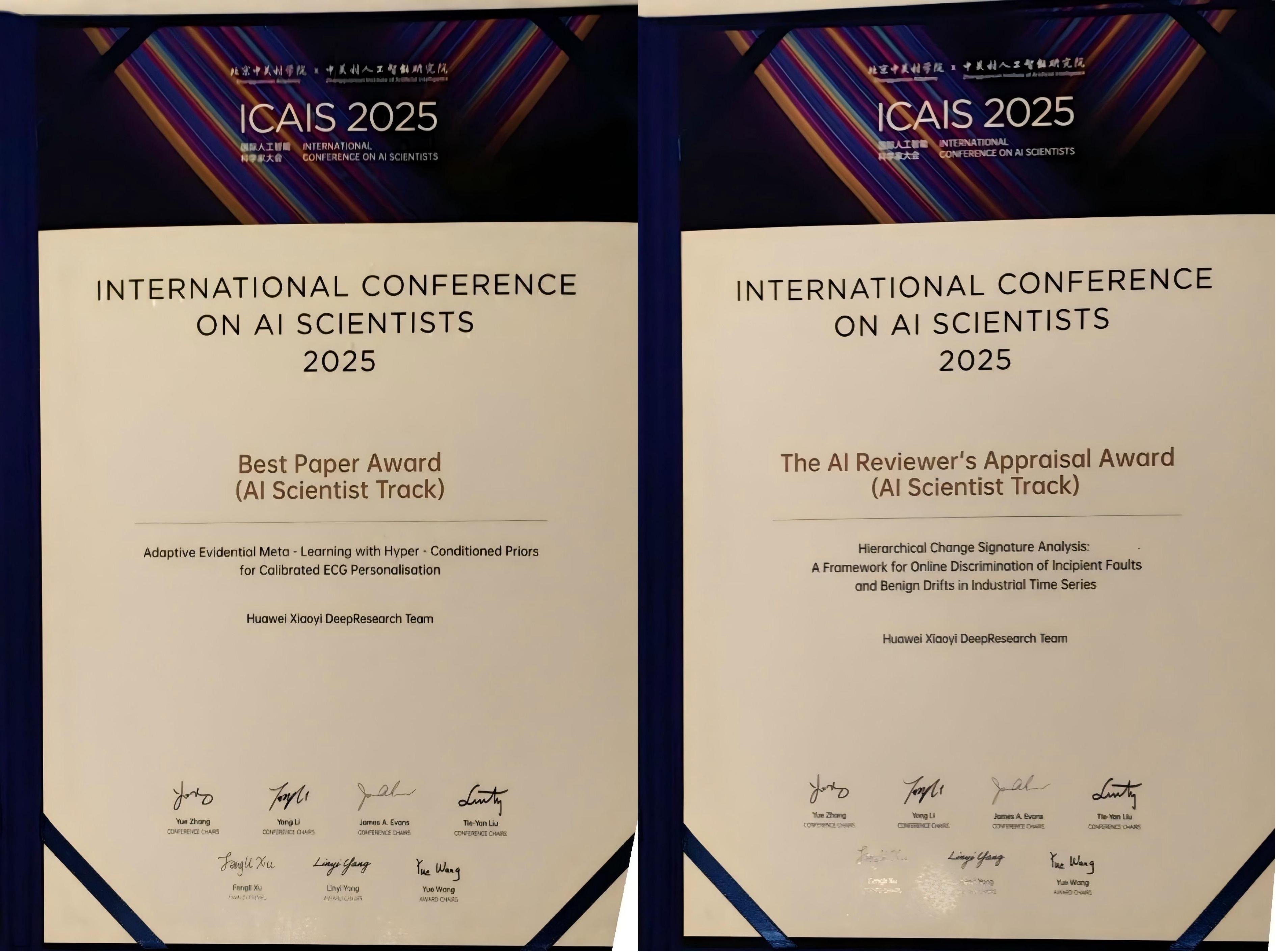
Best Paper & Appraisal Award |
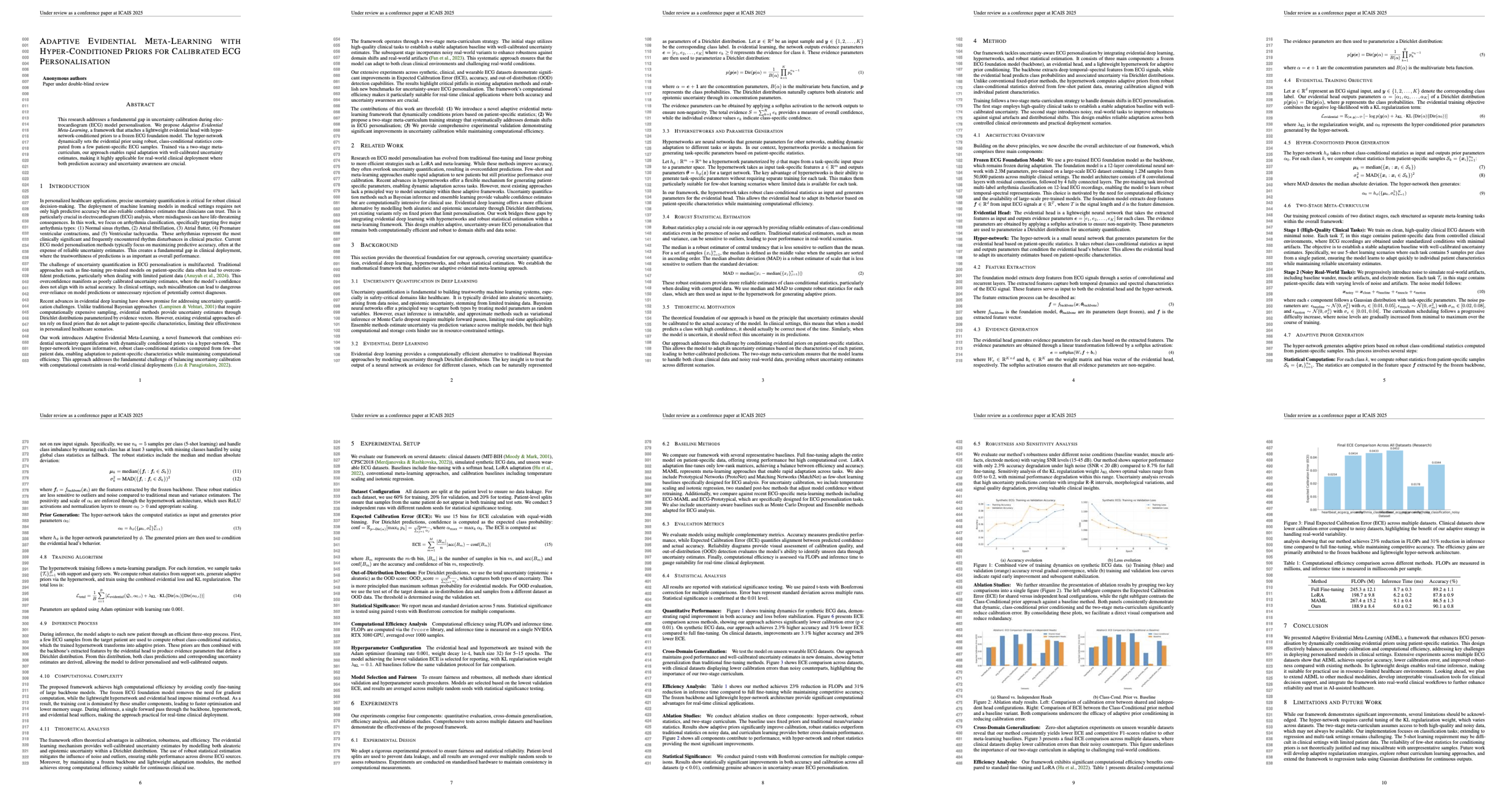
AI-Generated Best Paper |
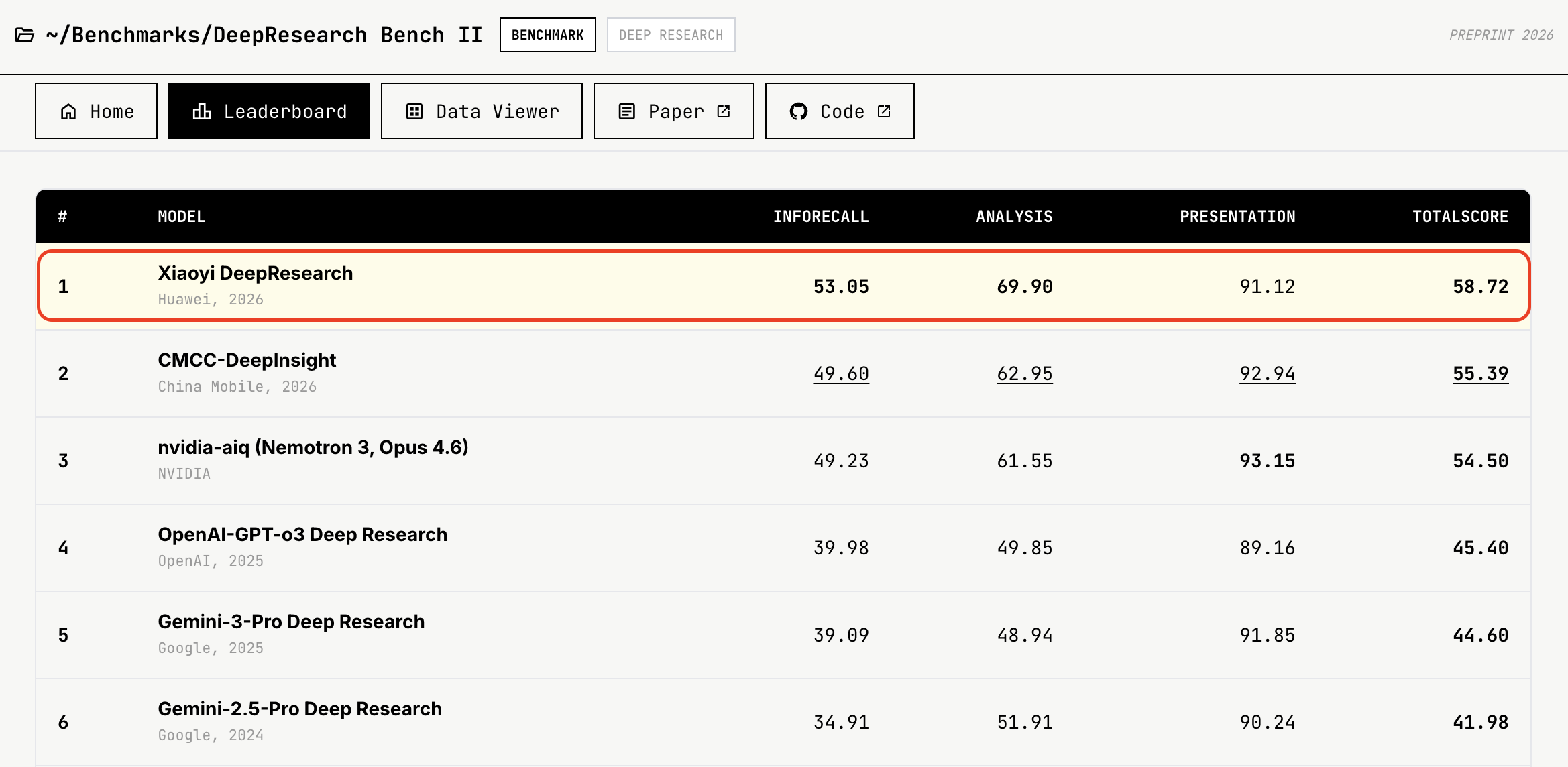
#1 on DeepResearch Bench II |
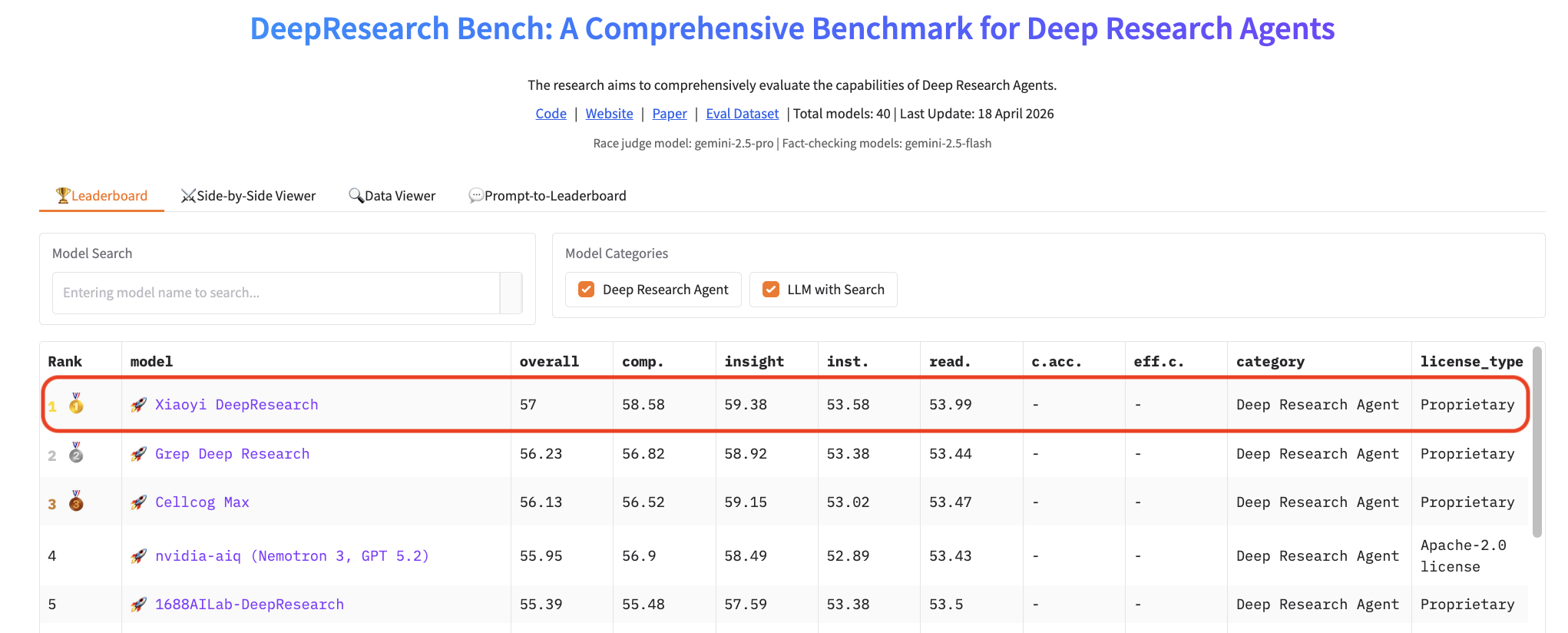
#1 on DeepResearch Bench |
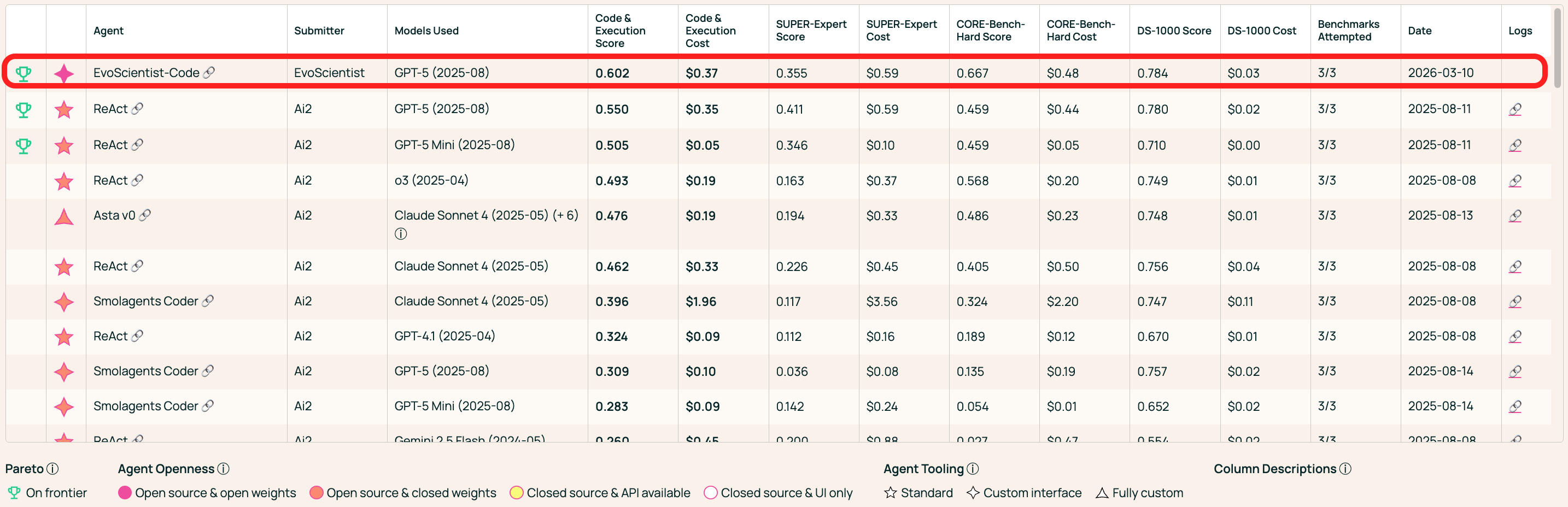
#1 on AstaBench Code & Execution |
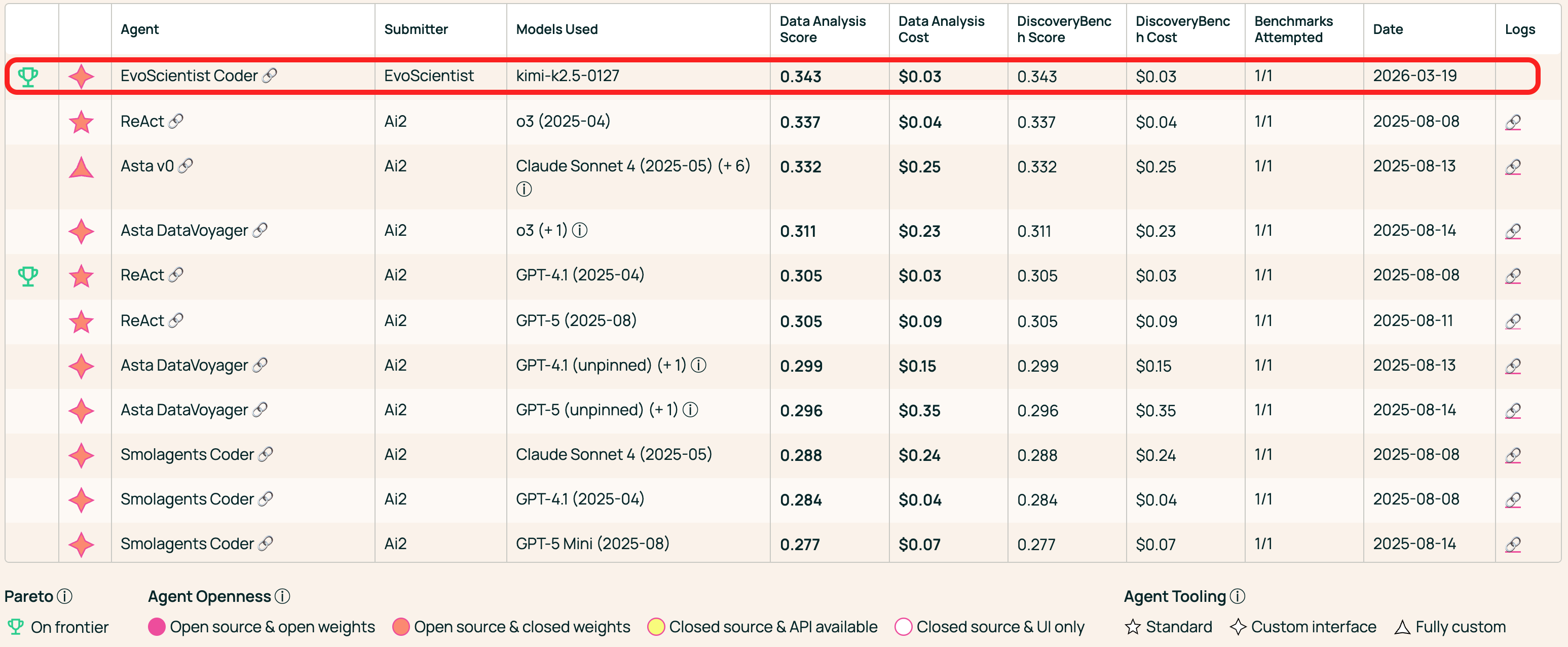
#1 on AstaBench Data Analysis |
⚡ Unified Control, Different Surfaces
🌐 Desktop WebUI |
|---|
🖥️ CLI / TUI |
📱 Mobile |
|---|---|
✨ Features
- 🤖 Multi-Agent Team — 6 sub-agents (plan, research, code, debug, analyze, write) working in concert.
- 🧠 Self-Evolving Memory — User profile and observations auto-distilled each turn, growing across sessions.
- 🌐 Multi-Provider — Anthropic, OpenAI, Google, MiniMax, NVIDIA — one config to switch.
- 📱 Multi-Channel — CLI as the hub; Telegram, Slack, Feishu, WeChat, and more — one agent session.
- 🖥️ Desktop WebUI — Workspace-panel web app, one terminal via
--ui webui. - 🔬 Scientific Workflow — Intake → plan → execute → evaluate → write → verify.
- 🔄 Code Generation Modes — More Effort (iterative refinement), continuously improving code quality.
- ⚡ Adaptive Tools — Per-turn tool selection keeps only relevant tools visible, reducing noise.
- ✂️ Context Editing — Dynamic system prompt rewriting based on conversation state.
- 🔌 MCP & Skills — Plug in MCP servers or install skills from GitHub on the fly.
Tip
Looking for ready-to-use research skills? Check out EvoSkills — powered by EvoScientist's engine and installable skills, the entire end-to-end research lifecycle is covered out of the box. EvoSkills are also compatible with other CLI coding agents.
🔥 News
- [03 Jun 2026] 🥈 Ranked #2 overall — and 🥇 #1 among
GPT-5.4-based agents — on ResearchClawBench (Agent Mode)! Leaderboard 👈 - [18 Apr 2026] 🥇 Ranked #1 on DeepResearch Bench at submission time! Leaderboard 👈
- [13 Apr 2026] 🥇 Reclaimed #1 on DeepResearch Bench II at submission time! Leaderboard 👈
- [26 Mar 2026] 🥇 Ranked #1 on AstaBench Data Analysis at submission time! Leaderboard 👈
- [25 Mar 2026] 🥇 Ranked #1 on AstaBench Code & Execution at submission time! Leaderboard 👈
- [13 Mar 2026] 🚀 EvoScientist officially debuts!
- [11 Mar 2026] ⛳ Technical Report is live! Check it out 👈
- [06 Mar 2026] 🥇 Ranked #1 on DeepResearch Bench II at submission time! Leaderboard 👈
- [24 Nov 2025] 🏆 6/6 accepted at ICAIS 2025 AI Scientist Track — Best Paper & AI Reviewer's Appraisal Award! Details 👈
📦 Release Highlights — version changelog
- [11 Jun 2026] v0.1.6 — Session persistence fix: WebUI /
langgraph devthreads survive restarts (SQLite checkpointer + scoped thread restore), memory-worker checkpoint cleanup (delete-on-completion + startup purge), short thread IDs in/threadsand resume hints. - [11 Jun 2026] v0.1.5 — Dangerous mode (real-filesystem access with safety checks), LangGraph streaming v3 pipeline, opt-in Anthropic prompt caching via OpenRouter, claude-fable-5, free-scrolling TUI, Windows CI support, public Cloudflare tunnel for
EvoSci deploy(--tunnel). - [07 Jun 2026] v0.1.4 — Auxiliary model for background tasks & tool selection, observation-memory lifecycle, Qwen3.7-Max/Plus (DashScope), UI-backend selection, plus an OpenRouter multi-turn reasoning fix.
- [03 Jun 2026] v0.1.3 — Multimodal handling (image + PDF/doc flatten/hoisting, text-only model fallback), runtime-context middleware, memory middleware → profile files with stream timeline narration, textual CJK-input fix.
- [02 Jun 2026] v0.1.2 — Browser WebUI mode,
EvoSci deploystandalone LangGraph server, default model → claude-sonnet-4-6, MiniMax M3, plus sandbox-timeout and async-notifier channel-routing fixes. - [19 May 2026] v0.1.1 — deepagents 0.6.2 DeltaChannel upgrade, tier-aware skill mounts, status & elapsed-time bar, QQ inline buttons.
- [08 May 2026] v0.1.0 — Async sub-agents (langgraph dev), official Docker image, personal WeChat, sessions-DB compaction.
- [26 Apr 2026] v0.0.9 — Faster startup, in-session model switching, unified slash commands, DeepSeek V4 thinking fix.
- [21 Apr 2026] v0.0.8 — Unified data directory, status bar, enhanced ask-user & auto-mode.
- [10 Apr 2026] v0.0.7 — Global skills directory, Moonshot/Kimi providers, ccproxy fixes, channel improvements.
- [03 Apr 2026] v0.0.6 — Dynamic context management, OpenRouter reasoning, More Effort mode, GLM-5.1.
- [27 Mar 2026] v0.0.5 — Context-retry middleware, OpenAI relay config, Feishu event-loop fix,
/compact. - [24 Mar 2026] v0.0.4 —
@filementions, resume history, Feishu WebSocket, LaTeX setup. - [20 Mar 2026] v0.0.3 — Voice input (STT), MiniMax/DeepSeek providers, MCP & skill browsers.
- [17 Mar 2026] v0.0.2 — OAuth sign-in, human-in-the-loop &
ask_user, headless serve mode. - [13 Mar 2026] v0.0.1 — First public release of the self-evolving AI Scientist.
📖 Table of Contents
- 📦 Installation
- 🔑 Configuration
- ⚡ Quick Start
- 🍪 Examples & Recipes
- 🔌 MCP Integration
- 📱 Channels
- 📚 Acknowledgments
- 🎯 Roadmap
- 🌍 Project Roles
- 🤝 Contributing
- 📝 Citation
📦 Installation
Tip
Requires Python 3.11+ (< 3.14). We recommend uv or conda for dependency management and virtual environments. Prefer to skip a local Python install entirely? Jump to 🐳 Docker.
🪛 Install uv (if you don't have it)
curl -LsSf https://astral.sh/uv/install.sh | sh
Quick Install
uv tool install EvoScientist
Note
To update an existing installation to the latest version, use
uv tool upgrade:uv tool upgrade EvoScientist
Or install into the current environment instead:
uv pip install EvoScientist
Latest from GitHub
To get the latest patches before a PyPI release:
uv pip install git+https://github.com/EvoScientist/EvoScientist.git
Development Install
git clone https://github.com/EvoScientist/EvoScientist.git
cd EvoScientist
uv sync --dev
enable pre-commit hooks:
uv run pre-commit install
Using conda
conda create -n EvoSci python=3.11 -y
conda activate EvoSci
pip install -e ".[dev]"
Using PyPi
pip install EvoScientist          # quick install
pip install -e ".[dev]"           # development install
Optional: Channel dependencies
Messaging channel integrations require extra dependencies. Install only what you need:
uv pip install "EvoScientist[telegram]"     # Telegram
uv pip install "EvoScientist[discord]"      # Discord
uv pip install "EvoScientist[slack]"        # Slack
uv pip install "EvoScientist[wechat]"       # WeChat
uv pip install "EvoScientist[qq]"           # QQ
uv pip install "EvoScientist[feishu]"       # Feishu
uv pip install "EvoScientist[all-channels]" # everything
Upgrade to the latest code base
git pull && uv sync --dev
🐳 Docker
A pre-built image is published to GitHub Container Registry with everything evosci onboard would otherwise install for you:
- Python 3.11, EvoScientist, and the cross-platform messaging channels (i.e.,
EvoScientist[all-channels]) uv— used by the MCP registry to install Python MCP servers on demand- Node.js 24 LTS +
npx— required by the majority of MCP servers
The iMessage channel isn't usable from the container — it requires the imsg CLI talking to macOS's Messages.app, which is host-OS-specific. Run EvoScientist directly on macOS if you need iMessage.
Running EvoScientist in a container also sandboxes the agent's shell access — file edits and shell commands stay confined to volumes you explicitly mount.
docker run -it --rm \
  --env-file .env \
  -v "$(pwd)/workspace:/workspace" \
  -v evosci-data:/home/evosci/.evoscientist \
  ghcr.io/evoscientist/evoscientist:latest
What the mounts are for:
| Mount | Purpose |
|---|---|
--env-file .env |
API keys (ANTHROPIC_API_KEY, OPENAI_API_KEY, …) |
./workspace:/workspace |
The agent's working directory |
evosci-data:/home/evosci/.evoscientist |
Persistent app state: sessions DB, global skills, memories, and config.yaml/mcp.yaml |
Important
The image runs as a non-root user (
evosci, UID1000). For the./workspacebind mount, the host directory must be writable by that UID. If your host user ID differs, eitherchown -R 1000:1000 ./workspaceonce, or pass--user "$(id -u):$(id -g)"on everydocker runso the container takes on your UID.
Or use docker compose (a starter docker-compose.yml is included):
docker compose run --rm evoscientist
To build the image locally instead of pulling:
docker build -t evoscientist:dev .
Note
Not bundled — install on demand by deriving from the image:
stt(speech-to-text viafaster-whisper) andoauth(ccproxy-api)- TinyTeX / LaTeX (
pdflatex,latexmk) for paper-writing skillsFROM ghcr.io/evoscientist/evoscientist:latest # Python extras USER root RUN uv pip install --python /opt/venv/bin/python "EvoScientist[stt,oauth]" USER evosci # TinyTeX # The official install method is `curl | sh`; if you'd rather not # pipe an unpinned remote script into a shell, fetch a specific TinyTeX # release tarball from https://github.com/rstudio/tinytex-releases, verify # its checksum, and extract to /home/evosci/.TinyTeX instead. RUN curl -sL https://yihui.org/tinytex/install-bin-unix.sh | sh \ && /home/evosci/.TinyTeX/bin/*/tlmgr install latexmk
🔑 Configuration
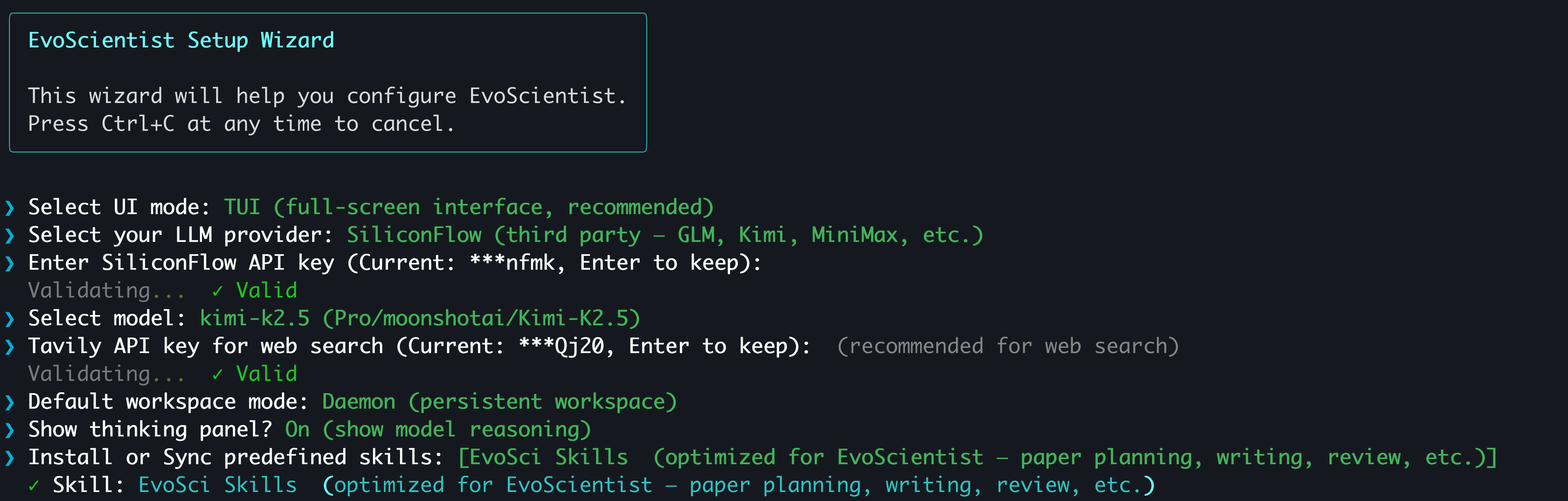
The easiest way to configure API keys is the interactive wizard:
EvoSci onboard
Tip
It walks you through provider selection, key validation, model choice, and workspace mode. Supports OAuth sign-in for CLI coding agent subscribers — no API key needed.
📟 Manual configuration via environment variables
Set at least one LLM provider key and (optionally) a search key:
# Pick one LLM provider
export ANTHROPIC_API_KEY="sk-..."   # Claude  — console.anthropic.com
export OPENAI_API_KEY="sk-..."      # GPT    — platform.openai.com
export GOOGLE_API_KEY="AI..."       # Gemini  — aistudio.google.com/api-keys
export MINIMAX_API_KEY="sk-..."     # MiniMax — platform.minimaxi.com (China, default) or platform.minimax.io (Global)
export MINIMAX_BASE_URL="https://api.minimax.io/anthropic"  # only needed for Global keys (default: https://api.minimaxi.com/anthropic)
export NVIDIA_API_KEY="nvapi-..."   # NIM    — build.nvidia.com

# Web search (optional)
export TAVILY_API_KEY="tvly-..."    # app.tavily.com
Or use EvoSci config set to persist keys in ~/.config/evoscientist/config.yaml.
Alternatively, copy the example .env file for project-level configuration:
cp .env.example .env # then fill in your keys
⚠️ Never commit
.envfiles with real keys. It is already in.gitignore.
⚡ Quick Start
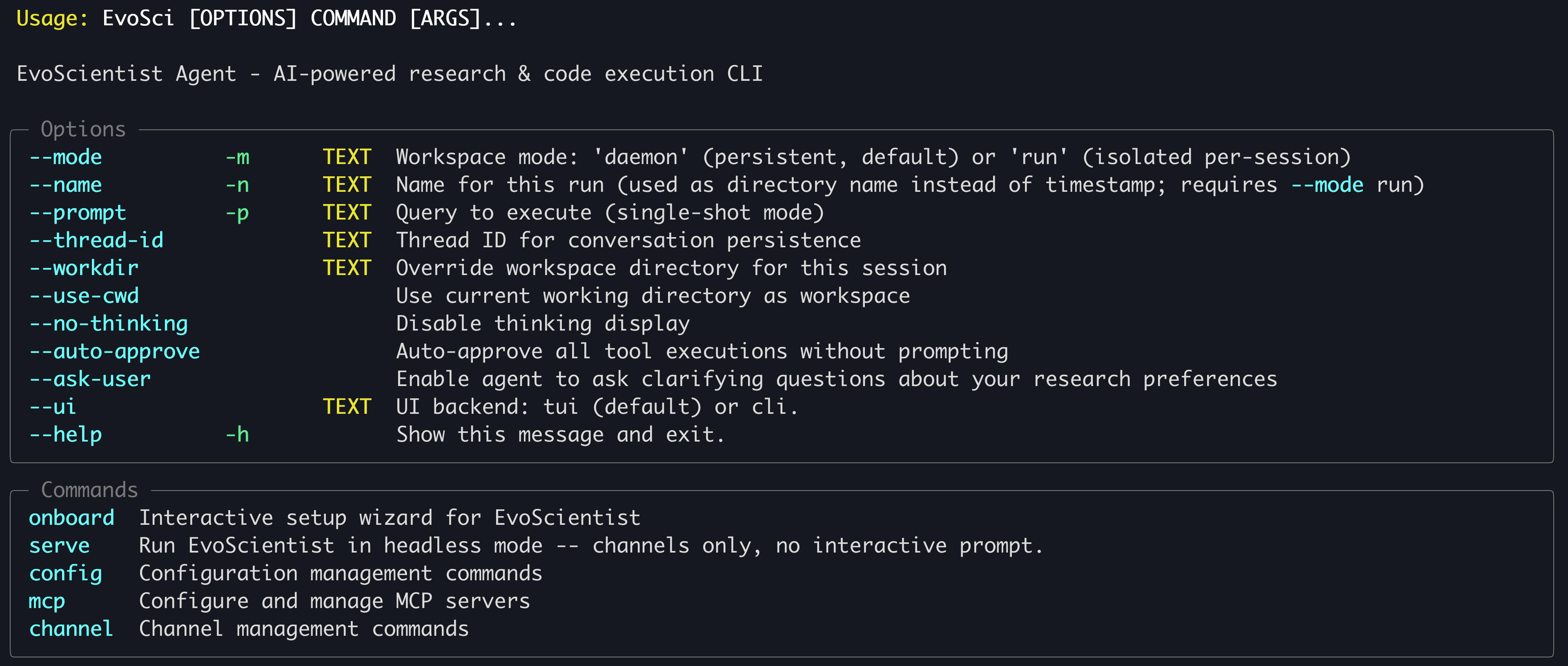
EvoSci # or EvoScientist — interactive mode (TUI by default)
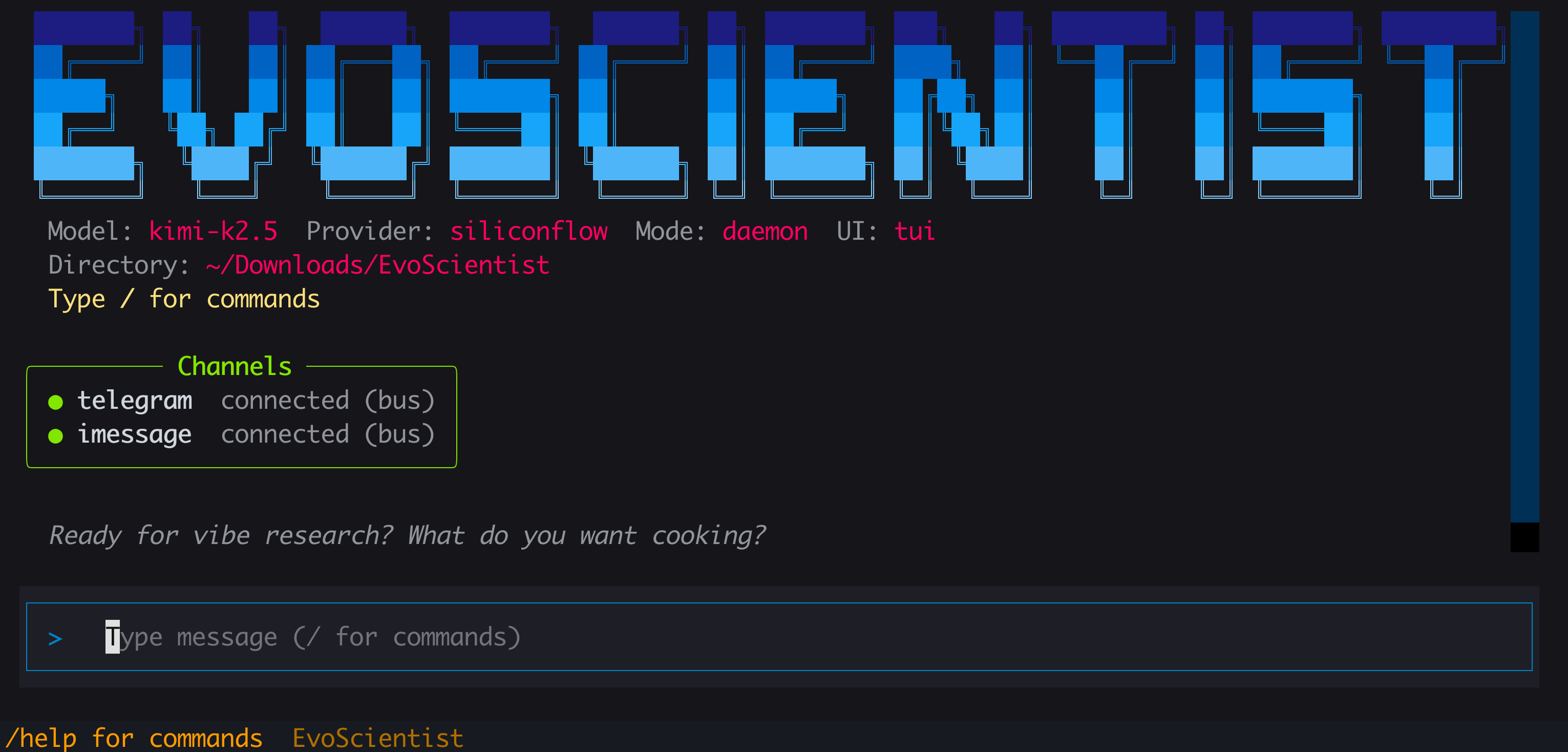
Run
EvoSci -hfor all CLI options.
Tip
Prefer a browser? Run
EvoSci --ui webuifor the web workspace UI. Need to copy long outputs? Use--ui clifor classic mode where native terminal copy works freely. On macOS, iTerm2 users can also hold⌥ Optionwhile dragging to select, then⌘+C.
Common examples
EvoSci                            # interactive mode (TUI by default)
EvoSci -p "your question"        # single-shot mode
EvoSci --workdir /path/to/project # open in a specific directory
EvoSci -m run                     # isolated per-session workspace
EvoSci --ui cli                   # classic CLI (lightweight)
EvoSci --ui webui                 # browser workspace UI (needs Node/npx)
EvoSci serve                      # headless mode — channels only, no interactive prompt
EvoSci deploy                     # standalone LangGraph server for external UIs / SDK clients
Desktop WebUI
Set the UI backend to webui and a fresh EvoSci session launches a deploy-style LangGraph server and the @evoscientist/webui front-end in one terminal — no second process to manage:
EvoSci config set ui_backend webui   # persist; or one-off with `EvoSci --ui webui`
EvoSci                               # opens http://localhost:4716
EvoSci config set webui_port 4800    # change the front-end port (must differ from the langgraph dev port)
Requires Node.js 24 LTS (for npx); the first launch downloads @evoscientist/webui and needs network. Note: the WebUI does not show your CLI/TUI chat history, and -p / --resume fall back to the classic CLI.
Action Approval
By default, shell commands (execute tool) require human approval before running. To skip approval prompts:
# Per-session: auto-approve via CLI flag
EvoSci --auto-approve
EvoSci -p "query" --auto-approve

# Persistent: set in config (applies to all future sessions)
EvoSci config set auto_approve true

# Or allow only specific command prefixes
EvoSci config set shell_allow_list "python,pip,pytest,ruff,git"
During a session you can also reply 3 (Approve all) at any approval prompt to auto-approve for the rest of that session.
Caution
Dangerous mode lifts the workspace sandbox entirely — the agent can read, write, and delete files anywhere on the real filesystem (privileged commands like
sudo/rm -rf /are still blocked). It implies--auto-approve(no prompts). Use only when you fully trust the task.EvoSci --dangerous # per-session EvoSci config set dangerous_mode true # persistent
Agent Questions
The agent can proactively ask you questions when it needs clarification (e.g., dataset choice, experiment direction). This is enabled by default. To disable:
# Persistent: set in config
EvoSci config set enable_ask_user false

# Re-enable
EvoSci config set enable_ask_user true
In-session commands
| Command | Description |
|---|---|
/current |
Show current session info |
/threads |
List recent sessions |
/resume |
Resume a previous session |
/delete |
Delete a saved session |
/new |
Start a new session |
/clear |
Clear chat history |
/skills |
List installed skills |
/install-skill <src> |
Add a skill from path or GitHub |
/uninstall-skill <name> |
Remove an installed skill |
/mcp |
Manage MCP servers |
/channel |
Configure messaging channels |
/help |
Show available commands |
/exit |
Quit |
Script Inference
from EvoScientist import EvoScientist_agent
from langchain_core.messages import HumanMessage
from EvoScientist.utils import format_messages

thread = {"configurable": {"thread_id": "1"}}
last_len = 0

for state in EvoScientist_agent.stream(
    {"messages": [HumanMessage(content="Hi?")]},
    config=thread,
    stream_mode="values",
):
    msgs = state["messages"]
    if len(msgs) > last_len:
        format_messages(msgs[last_len:])
        last_len = len(msgs)
🍪 Examples & Recipes
A curated collection of official examples, advanced usage patterns, and community-contributed recipes to help you get the most out of EvoScientist.
👉 Browse all examples & recipes
🔌 MCP Integration
Add external tools via MCP servers with a single command:
# Usage
EvoSci mcp add <name> <command> [-- args...]

# Example
EvoSci mcp add sequential-thinking npx -- -y @modelcontextprotocol/server-sequential-thinking
Tip
For command options, config fields, tool routing, wildcard filtering, and troubleshooting, see the MCP Integration Guide.
📱 Channels
Connect messaging platforms so they share the same agent session as the CLI:
# Usage
EvoSci channel setup <channel>

# Example
EvoSci channel setup telegram
Multiple channels can run concurrently — comma-separate names in the config:
channel_enabled: "telegram,slack,feishu,qq"
The channel can also be started interactively with /channel in the CLI session.
Tip
For per-channel setup guides, capability matrix, architecture details, and troubleshooting, see the Channel Integration Guide.
📚 Acknowledgments
This project builds upon the following outstanding open-source works:
- LangChain — A framework for building agents and LLM-powered applications.
- DeepAgents — The batteries-included agent harness.
We thank the authors for their valuable contributions to the open-source community.
🎯 ᯓ➤ Roadmap
Coming soon:
- 🖥️ Full-screen TUI and classic CLI interfaces
- 📻 EvoMemory v1.0 shipped
- ⚒️ 200+ predefined skills built in
- 🧩 Built-in research-lifecycle skills shipped
- 👋 Human-in-the-loop action approval
- 🦾 Agent-initiated human clarification
- 📑 Technical report on the way
- 🔐 OAuth sign-in (CLI coding agent subscribers)
- 📺 Web app with workspace UI
- 📹 Demo and tutorial in the works
- 📊 Benchmark suite to be released
- ⏰ Scheduled tasks for the core system planned
Stay tuned — more features are on the way!
🌍 Project Roles
Core Contributors

Xi Zhang |
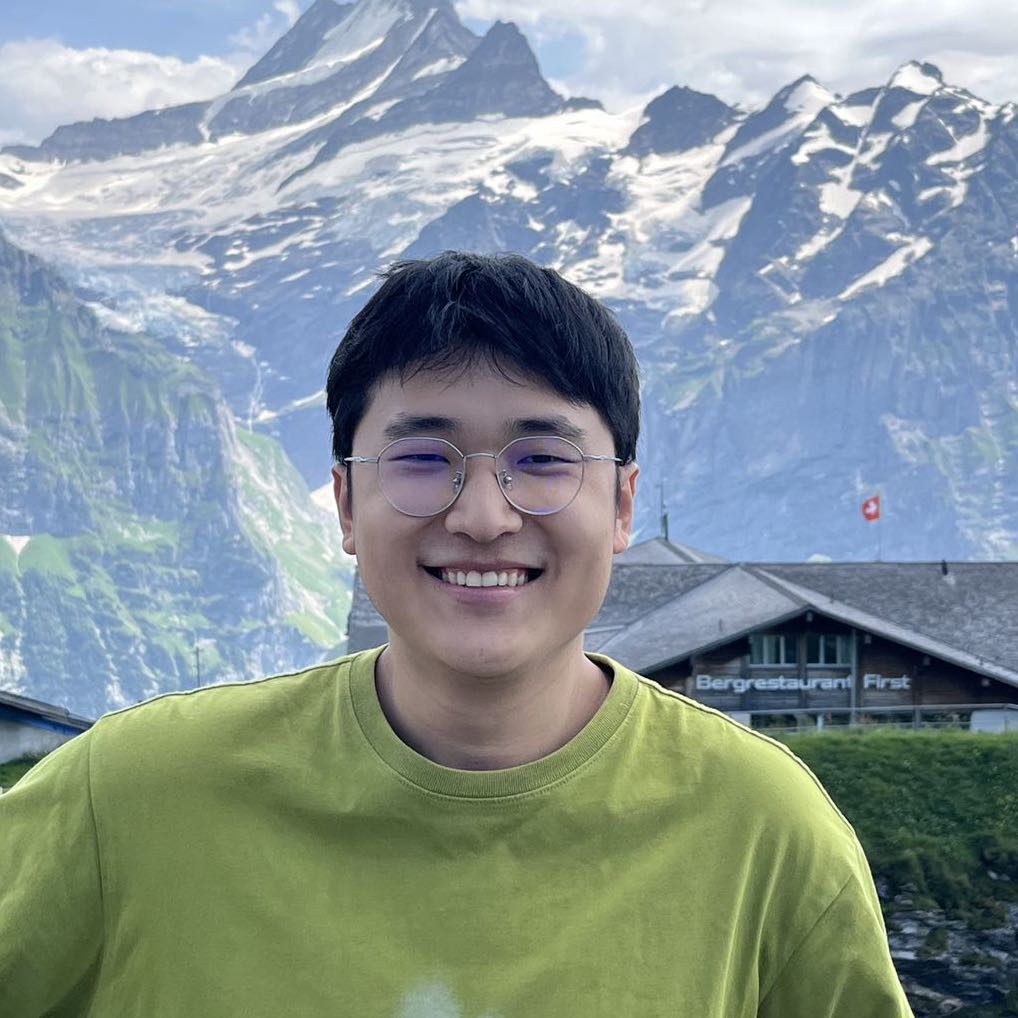
Yougang Lyu |

Dinos Papakostas |
Yuyue Zhao |
Ziheng Zhang |
Xiaohui Yan |
Contributors
Jan Piotrowski, Wiktor Cupiał, Jakub Kaliski, Jakub Filipiuk, Xinhao Yi, Shuyu Guo, Andreas Sauter, Wenxiang Hu, Jacopo Urbani, Zaiqiao Meng, Jun Luo, Lun Zhou
Xiaoyi DeepResearch Team and the wider open-source community contribute to this project.
For any inquiries or collaboration opportunities, please contact: EvoScientist.ai@gmail.com
🤝 Contributing

We welcome contributions from developers, researchers, and AI coding agents at all levels. Our Contributing Guidelines are designed for both humans and AI agents — covering architecture, patterns, extension guides, and code standards to help you contribute safely and effectively.
👥 Community Contributors
⚗️ Join the EvoScientist community to discuss AI-driven research, share experiment results, and help shape the future of automated scientific discovery.
-
Discord — Ask questions, share findings, and collaborate with researchers and developers in real-time.
-
WeChat — Connect with our Chinese-speaking research community.

Every contribution brings us one step closer to a future where AI accelerates scientific breakthroughs for all of humanity.
📝 Citation
If you find our paper and code useful in your research and applications, please cite using this BibTeX:
@article{evoscientist2026,
  title={EvoScientist: Towards Multi-Agent Evolving AI Scientists for End-to-End Scientific Discovery},
  author={Yougang Lyu and Xi Zhang and Xinhao Yi and Yuyue Zhao and Shuyu Guo and Wenxiang Hu and Jan Piotrowski and Jakub Kaliski and Jacopo Urbani and Zaiqiao Meng and Lun Zhou and Xiaohui Yan},
  journal={arXiv preprint arXiv:2603.08127},
  year={2026}
}
📜 License
This project is licensed under the Apache License 2.0 - see the LICENSE file for details.